
Adding money to your Ludo Vegas account is simple. Follow this easy deposit guide to understand how to transfer money using Easypaisa, JazzCash, or another supported banking app.
Steps to Deposit Money in Ludo Vegas
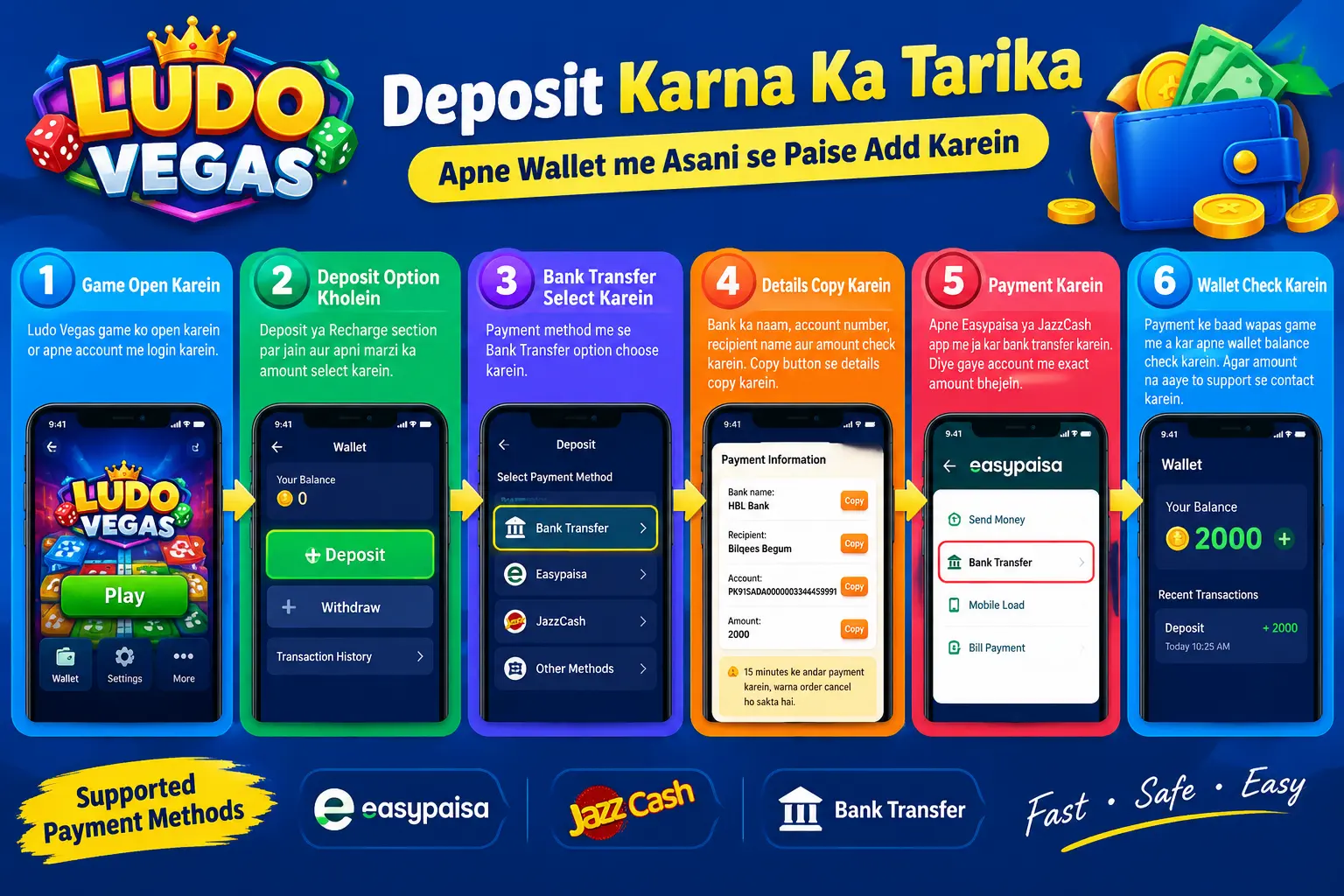
Step 1: Open Ludo Vegas
Open the Ludo Vegas game on your mobile and log in to your account.
Step 2: Open the Deposit Option
Go to the Deposit or Recharge section and select the amount you want to deposit.
Step 3: Select Bank Transfer
Choose the Bank Transfer option. The game will show the payment details for your order.
Step 4: Copy the Payment Details
Check the bank name, recipient name, account number, and deposit amount. Use the Copy buttons to copy the correct information.
Step 5: Open Easypaisa or JazzCash
Open your payment app and select Bank Transfer. Choose the supported bank or payment method shown in your Ludo Vegas deposit instructions.
Step 6: Transfer the Exact Amount
Enter the recipient’s account details and the exact amount shown on your Ludo Vegas deposit page. Check all details carefully before confirming the payment.
Step 7: Check Your Wallet
After making the payment, return to Ludo Vegas and check your wallet balance. If the amount does not appear within 15 minutes, contact the game’s official support service and share your payment receipt.
Important Deposit Tips
- Always use the latest payment details displayed in your own game account.
- Transfer the exact amount shown on your deposit order.
- Never send money to an account from an old screenshot or an unverified source.
- Keep your payment receipt until the deposit is confirmed.
- Check the payment details carefully because transfers may be difficult to reverse.
Final Words
This Ludo Vegas deposit guide explains how to add money using a supported payment method. Follow each step carefully, verify the account details, and contact official support if your payment is delayed. Remember that deposits involving real money carry financial risks, so only spend what you can afford to lose. Now visit our homepage: Ludo Vegas to download your favourite game.